
What if we decouple an Agent’s context and computational power from its host environment?
Whether we’re running an Agent locally, or hosting it in the cloud, their context and computing power are typically constrained to their host environment.
Want to hear more about our motivations for this experiment? Listen to this clip from project lead Reto Meier.
When we run our agent locally, we get a lot of the same advantages as running our IDEs locally: Our dev machines are usually more powerful than cloud-based dev environments, and we set up our local machines so they have access to all the sources of context we need.
As agents become more deeply embedded into our development workflow, the advantages of cloud-hosted agents become much clearer.
Using a cloud-based Agent for a long-running task (or several tasks working on various projects), we can:
- Keep working while our laptop is closed.
- Start, monitor, and review work from any device (especially a phone).
- Use cloud compute to scale beyond our local machines.
Cloud-based agents like Jules usually provide their own execution environments, but in this experiment we will explore bridging our cloud hosted agent with:
- A variety of different cloud-based execution environments.
- Our local execution environment.
Bring your own cloud execution environment
The hosted prototypes for MoMoA and MoMoA Researcher use Cloud Run instances with 1 CPU and 1GB of RAM, which aren’t really enough to do much beyond provide a harness for the mixture of mixture of agents. Jules runs within far more capable VMs, which we utilized in the Agentception experiment to perform builds and run tests.
That may still not be enough. Building mobile apps is notoriously resource intensive and, as we saw in our MoMoA Researcher experiment, any kind of meaningful experimental research will require much more computing power. A lot of software projects also come with specific requirements and dependencies for building, testing, linting, and CI/CD.
Let’s decouple the Run Code and Optimize tools from the Agent’s host environment
We start with an ExecutionProvider, which takes an ExecutionRequest that includes a command to be run, runs the command, and returns an ExecutionResponse.
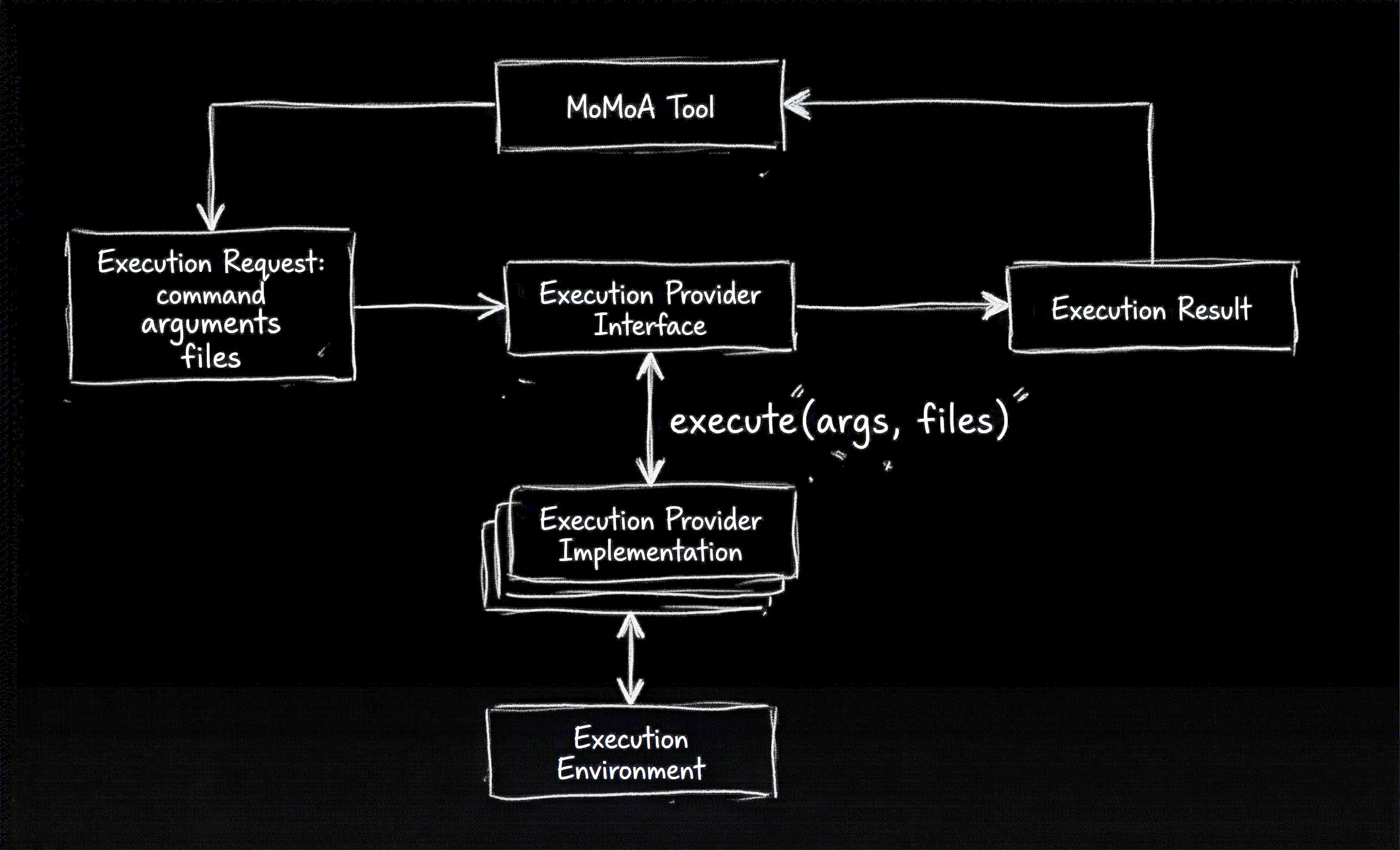
Figure 1. A tool creates an execution request and sends it to an execution provider that performs the command and returns the results.
The ExecutionResponse encapsulates all the output generated by the Execution Provider that ran the command:
export interface ExecutionResponse {
  stdout: string;
  stderr: string;
  exitCode: number | null;
  generatedFiles: FilePayload[];
}
In the MoMoA Researcher, the Run Code and Optimizer tools created a temporary folder in the Agent’s host environment, downloaded the files, executed the code, and returned the output. That same workflow gets handled by the execute method in the localExecutionProvider.
If you’re hosting your agent in an environment that’s not implicitly sandboxed, you’ll want to modify the Local Execution Provider so that it runs in a container.
Our purpose is to move our execution off the Agent’s host
We can categorize execution environments into:
- Ephemeral scaling sandboxes
- Persistent development environments
- Remote desktops
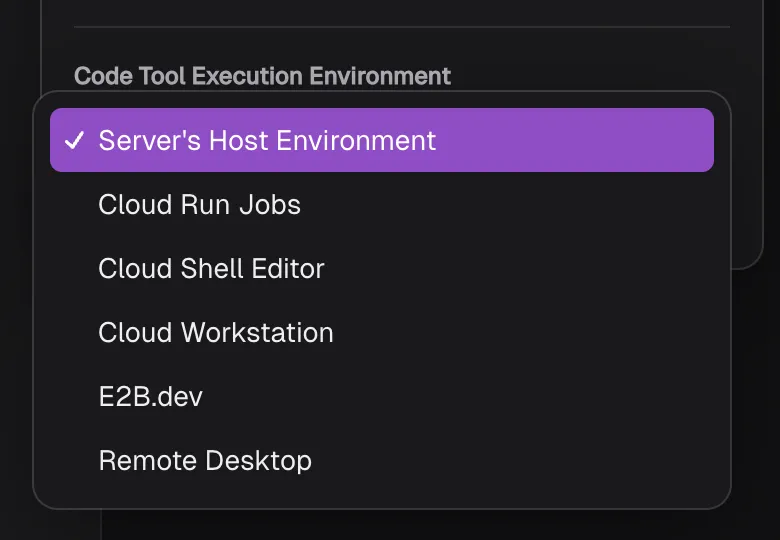
Figure 2. The execution providers available to use as code execution backends.
Ephemeral scaling sandboxes
E2B Sandboxes and Cloud Run Jobs are designed to spin up, execute a high volume of tasks in parallel, and then vanish. They’re ideal for our MoMoA Researcher that may require significant resources depending on the experiments we want to run.
Persistent cloud development environments
Google Cloud Workstations and Google Cloud Shell Editor are Cloud-based IDEs that provide a development environment in the cloud, that you can connect to remotely. Both maintain state between sessions so you can set up more complex environments. Workstations are managed and customizable and Cloud Shell Editor is completely free to use, which is nice.
Remote desktop execution environments
Tools like VNC and Chrome Remote Desktop let you connect to your local computer from other devices.
To give our cloud-hosted agent direct access to our remote desktop we can create a persistent SSH tunnel between our computer and our agent, but that carries risks:
- Privacy: A persistent “hole” in our local firewall can expose your local machine to the public internet.
- Security Vulnerabilities: SSH tunnels often bypass traditional network security.
- Cost and Complexity: Maintaining a reliable, always-on tunnel often requires third-party services (Eg. Cloudflare Tunnels) to handle NAT traversal and rotating IP addresses, which can introduce costs and additional security and privacy risks.
- Maintenance Overhead: Tunnels are prone to “silent failures” where the connection drops due to network instability or idle timeouts, requiring complex heartbeat logic or auto-reconnect scripts to ensure the agent remains functional.
For this experiment we don’t need full control, so we explored a simpler solution.
A remote queue execution client
Rather than connect our Agent directly to our local environment, we’ll build an Execution Provider that creates a queue of tasks and a local client that completes tasks and returns results.
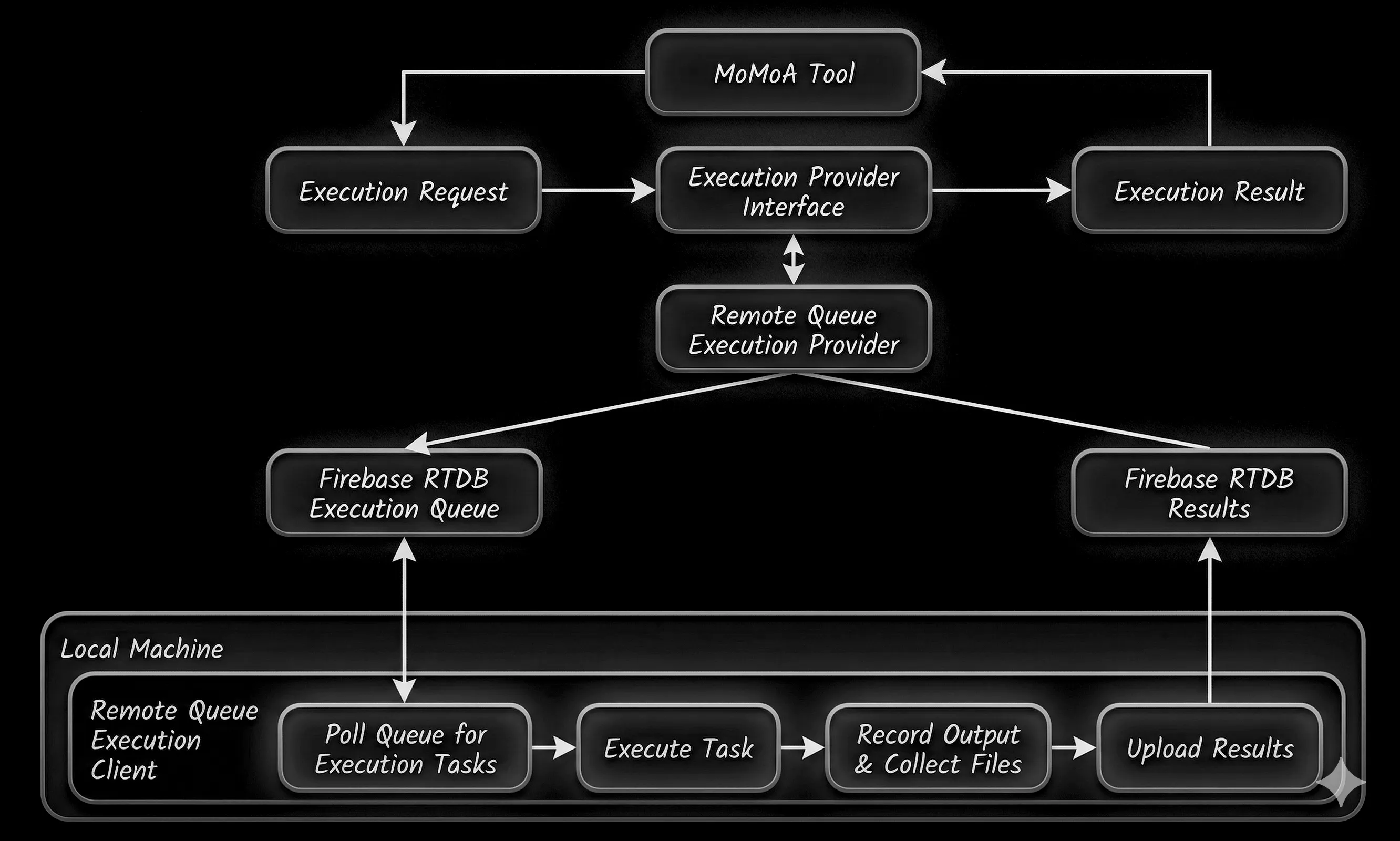
Figure 3. Basic dataflow for a local client execution provider.
The two environments don’t communicate directly, instead using Firebase Realtime Database as a pubsub provider for the queue. All traffic is over HTTP/HTTPs, so our existing network security and data auditing remains in place.
This experiment utilizes a simple
API KEYapproach to connect the client to the right queue, but we could implement a more robust authentication handshake if / as required.
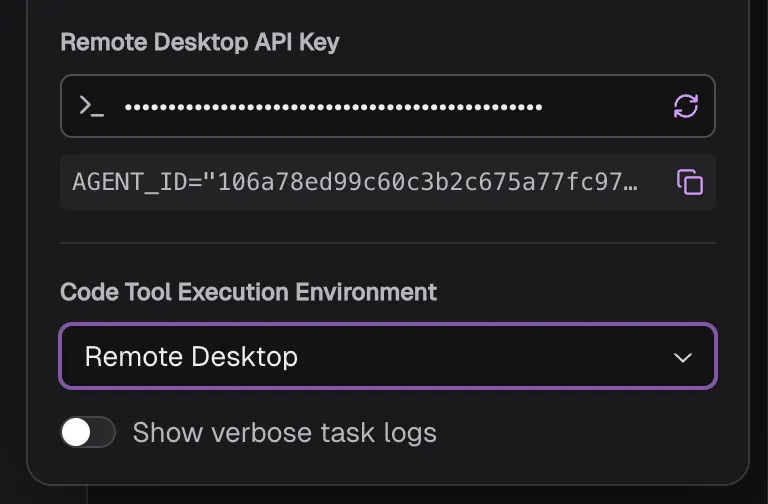
Figure 4. The Remote Desktop Execution Provider and API Key.
This experiment includes a sample NodeJS CLI implementation, that includes:
- Hardware throttling: Concurrent tasks are limited based on the number of CPUs and available memory.
- Sandboxing and cleanup: Tasks are executed in isolated temporary staging directories that are removed on completion.
- Payload file size control: Generated files are filtered, including hard limits on file sizes.
Hardware detected: 12 CPU cores. Agent will run up to 12 tasks concurrently.
Starting Local Execution Agent: 106a78b...
[+] Successfully synchronized with server. Pending tasks cleared.
Polling for tasks every 3000ms...
[+] Received Task: 6c4ee65d-4133-4c85-84b2-0af11e7c0ddf (Active Tasks: 1/12)
[+] Received Task: 041949a8-3569-44e8-8541-970d93ac7c41 (Active Tasks: 1/12)
[+] Received Task: 2b735b5c-ad17-4533-a337-f51922445266 (Active Tasks: 2/12)
[+] Received Task: 2c00e827-910d-4f53-a34e-cb802faf4f02 (Active Tasks: 2/12)
[+] Received Task: 573399fb-f8fe-4a82-b2f1-9922deb70c8f (Active Tasks: 3/12)
[+] Received Task: 6463e6cb-0243-40f4-abe8-96e5e58c4a77 (Active Tasks: 4/12)
[+] Received Task: 98090c52-ed21-415f-b98b-c189500b84be (Active Tasks: 5/12)
[+] Received Task: 9cd96c0d-4eaa-4e92-a603-6205d35e5dc5 (Active Tasks: 6/12)
[+] Task 041949a8-3569-44e8-8541-970d93ac7c41 complete. Results uploaded successfully.
[+] Task 2c00e827-910d-4f53-a34e-cb802faf4f02 complete. Results uploaded successfully.
[+] Task 573399fb-f8fe-4a82-b2f1-9922deb70c8f complete. Results uploaded successfully.
[+] Task 6463e6cb-0243-40f4-abe8-96e5e58c4a77 complete. Results uploaded successfully.
[+] Task 9cd96c0d-4eaa-4e92-a603-6205d35e5dc5 complete. Results uploaded successfully.
[+] Task 98090c52-ed21-415f-b98b-c189500b84be complete. Results uploaded successfully.
The protocol is simple RPC over HTTP for fetching a task and returning results, so it’s easy to modify or expand these restrictions by:
- Executing all tasks within a containerized environment.
- Explicitly excluding certain commands from being run.
- Restricting network access or the ability to modify files outside the execution sandbox.
Using a local client to fetch local context
Now that our cloud-agent can execute tasks on our local machine, we can utilize this bridge to fetch local context. The FactFinderTool uses the Local Execution Provider to queue a new Execution Request to run the local_fact_finder.js script.
In this experiment the local Fact Finder script is a simple ReAct loop powered by the Gemini API, that runs on the remote desktop machine and has tools to read the content of a specified folder (and the files within it) and return a natural language response.
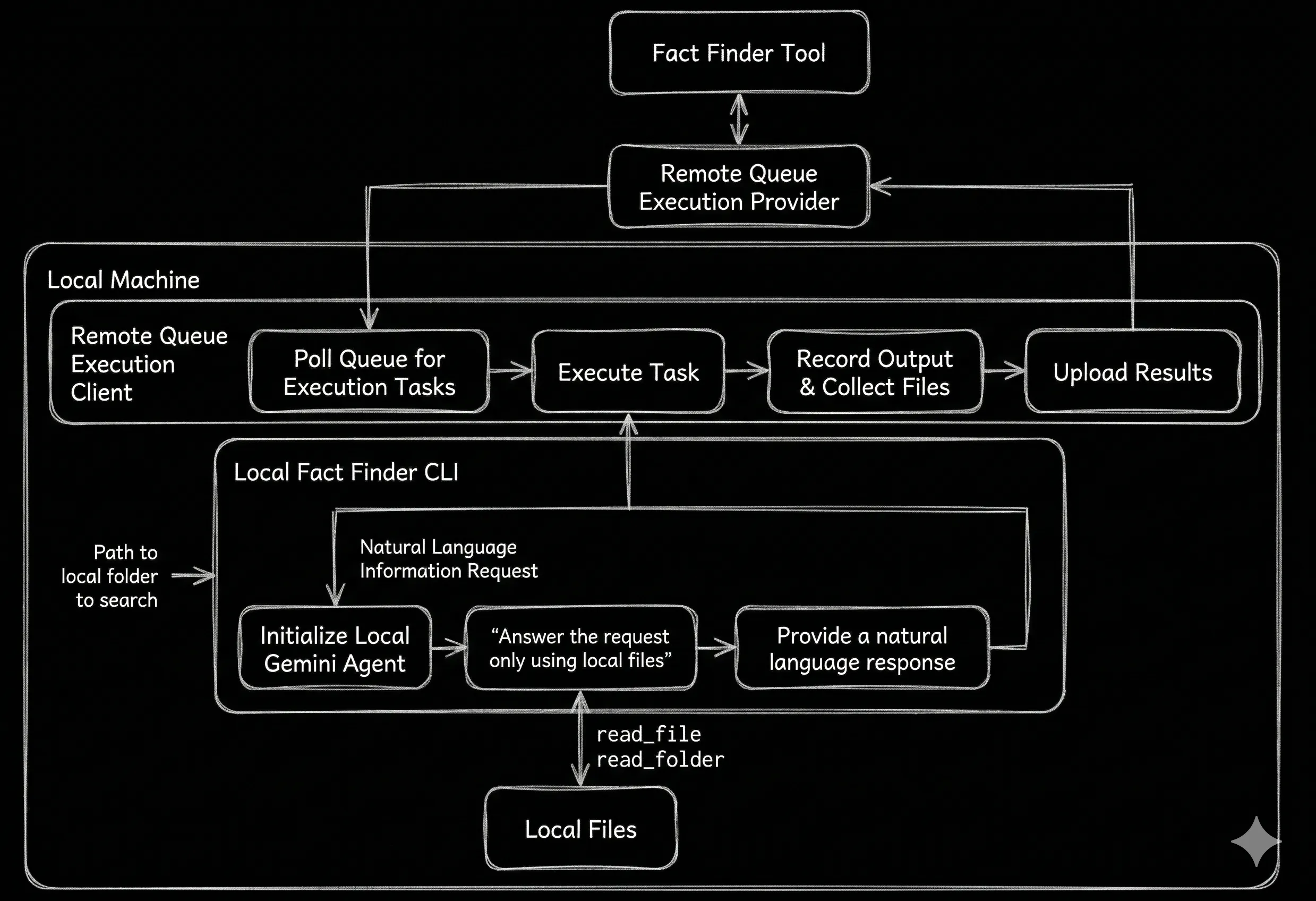
Figure 5. The Fact Finder tool uses the Local Client Execution Provider to run a client-side Gemini Agent to answer questions based on local context.
Alternatively, you could implement the Local Fact Finder script to:
- Use an “offline” agent using Gemma 4 to avoid sending full files to any cloud-based LLM.
- Implement a RAG database for lookup and avoid client-side LLM calls entirely.
- Expand the scope of available context to network connected resources.
- Have the script execute within a container to explicitly limit what it has access to.
Resilience and a stateless architecture
The Remote Desktop Execution Provider just queues tasks and waits for responses. That means we can have different (or multiple!) remote desktops serving the same queue, but also needs mitigation when:
- No remote desktop client is available.
- A client takes a task from the queue but never returns a result.
- Different clients have different local context.
- An available client doesn’t have computing power for a queued task.
Rather than using a basic FIFO queue, we can specify requirements for each task and capabilities for our clients. We also need to consider how to handle requests that can (and should) be run concurrently.
Decoupled execution environments enable parallelization of tasks
Each Execution Request can include a batch of tasks to run via the envs parameter.
const flattenedEnvs: NodeJS.ProcessEnv[] = [];
for (const job of jobs) {
    for (let t = 0; t < trials; t++) {
        flattenedEnvs.push({
            ...job,
            RANDOM_SEED: String(Date.now() + t),
            _momoa_job_config: JSON.stringify(job)
        });
    }
}
Each Execution response includes the index for the executed task, and the task’s duration and peak memory use.
export interface ExecutionResponse {
  // [... Existing definition ...]
  durationMs?: number;
  peakMemory?: number;
  index?: number;
}
This is important as the Tool is responsible for telling the Execution Provider the time and memory cost per task.
export interface ExecutionRequest {
  // [... Existing definition ...]
  envs?: NodeJS.ProcessEnv[];
  estimatedTaskDurationMs?: number;
  estimatedTaskPeakMemory?: number;
}
The Optimizer Tool executes a single dry run and uses the resulting time and memory results when initiating the larger batch.
The Execution Providers then parallelize the work:
- The remote desktop client and Cloud Shell Editor have fixed resources, so parallelization is based on the available CPUs and memory.
- Cloud Workstations can be upgraded to provide a more powerful VM, but not at runtime, so the Execution Provider uses the same CPU and memory based approach to scaling.
- Cloud Run Jobs and E2B Instances are horizontally scalable at runtime, meaning that we can start multiple parallel instances to execute an arbitrary number of concurrent jobs based on our budget.
Cloud Run Jobs have a minimum charge of 60 seconds, so we assign tasks so that each Cloud Run Job runs for at least 60 seconds. E2B instances don’t have a minimum charge, but do have a set number of allowed concurrent instances.
What’s next?
Rather than choosing one source for executing all tasks, we could create an execution pool where we define the capabilities of each available Execution Provider instance, and our preferences for utilizing them. This would allow us to parallelize task execution across multiple back-end systems depending on capacity and capability. It also provides a fall-back if our preferred remote desktop is offline.
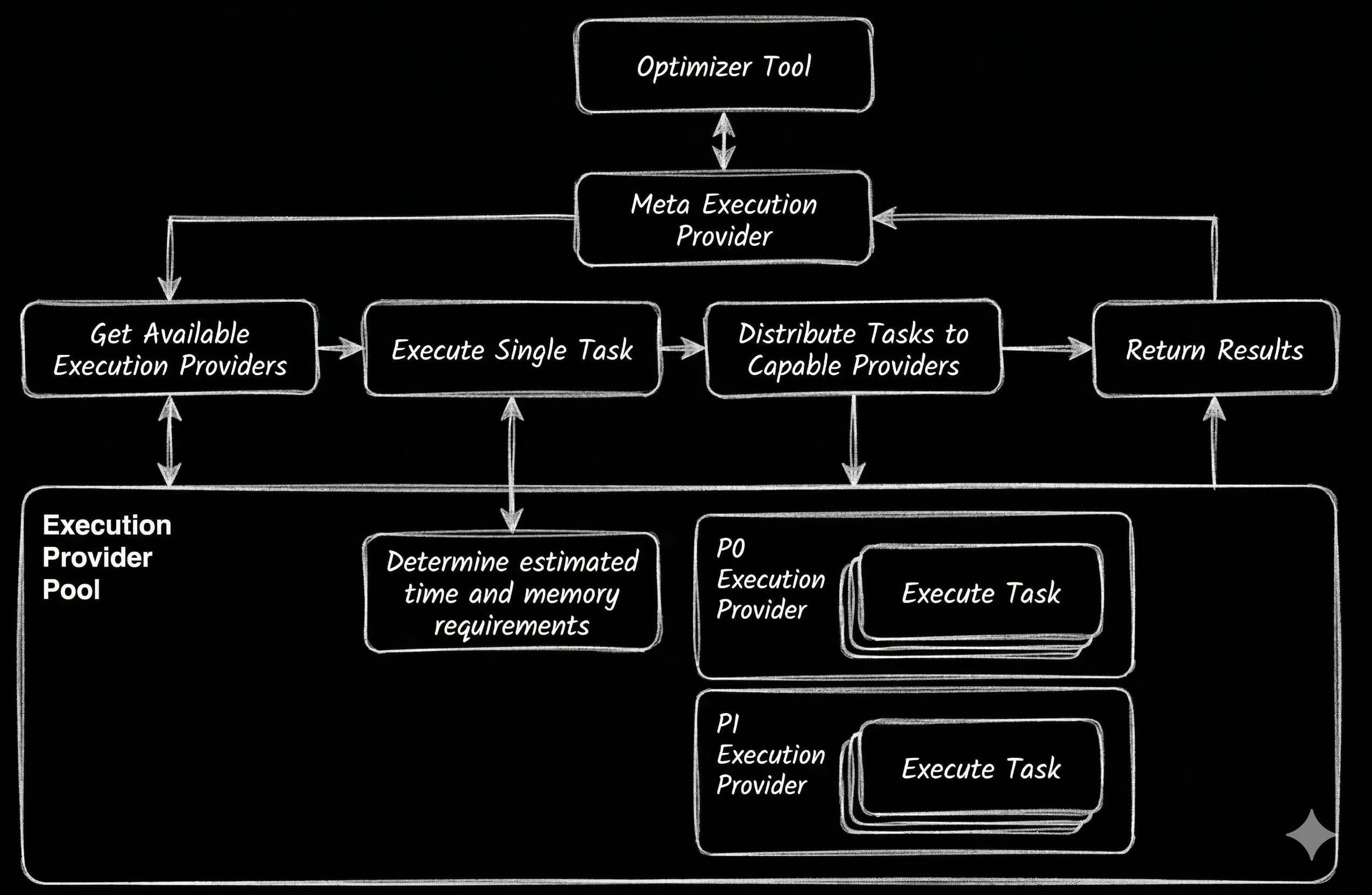
Figure 6. The Execution Provider determines the compute requirements for the Optimizer Tool’s parallel tasks before assigning them to available Execution Providers based on a predetermined prioritization.
This approach lets us utilize the available computing power, optimized against cost, power, and / or availability based on our requirements.
We could choose to execute tasks using Remote Desktop Execution Providers when available, overflowing (or falling back) to our Cloud Shell Editor and Cloud Workstations, with any remaining required execution being performed using Cloud Run Jobs up to a fixed budget.
Decoupling the source of computing resources and context from the long-running agent’s host environment introduces some interesting follow-up possibilities, including:
- What if we specified a set of requirements for each Execution Request, and corresponding capabilities for each Execution Provider (and individual local client)?
- What if instead of running a Fact Finder script, our Agent could trigger a local CLI Agent?
- What other sources of compute can we implement as Execution Providers?
- What other tools can we create to run on remote desktop environments?
A note on the code
All the code in the repo was written with extensive AI-assistance—there’s definitely code no human has ever reviewed—using a combination of the Gemini App, Jules, and the MoMoA prototype.